
LocalAI: Run LLMs, Images & Video on Any Hardware, No GPU Required
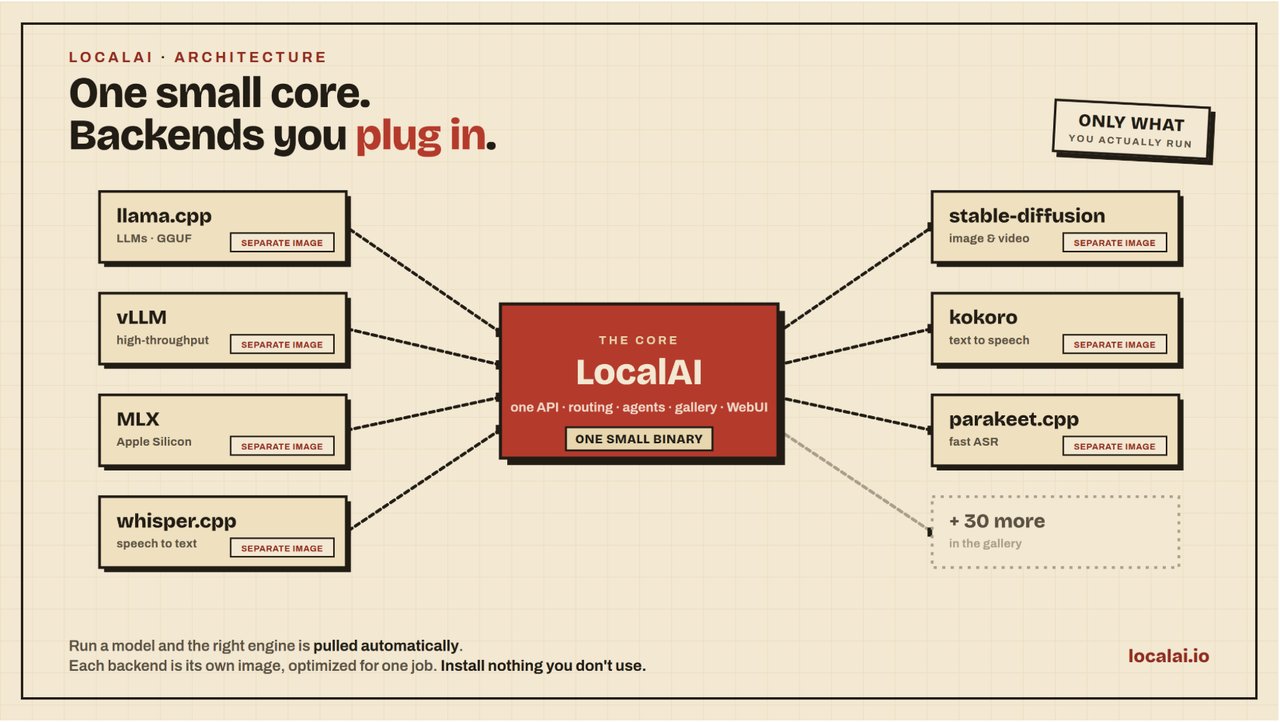
Let's be honest: 2026 had us all wondering if running AI meant selling a kidney for a data-center GPU. Then open-source projects like LocalAI came along and flipped the script. LocalAI is a self-hosted, open-source AI engine that can run LLMs, image generation, video models, speech recognition, text-to-speech, and a whole lot more — on your own machine, without a GPU, and with full privacy. If you've been looking for a way to escape API lock-in, this is your ticket.
What makes LocalAI different?
The project describes itself as 'a small core, not a bundle.' Instead of shipping every possible dependency in one giant binary, LocalAI is designed to be composable: each backend wraps a proven engine like llama.cpp, vLLM, whisper.cpp, stable-diffusion, or MLX in its own container image. That backend is only pulled when a model actually needs it. This means you don't install a mountain of software you'll never use, and you can extend LocalAI with custom backends in any language.
LocalAI is also a drop-in replacement for APIs you already know. It's compatible with the OpenAI API, Anthropic API, and ElevenLabs audio API across all its modalities. So if you already have code written for a hosted API and decide to go local, all you usually need to change is the endpoint URL.
The no-GPU magic
Most popular models run fine on CPU, but slower, and LocalAI supports hardware acceleration when you have it: NVIDIA (CUDA 12/13), AMD (ROCm), Intel (oneAPI), Apple Silicon (Metal), Vulkan, and even NVIDIA Jetson devices. You can start with a single CPU laptop, then move to a GPU later without changing your workflow. LocalAI also detects your GPU capabilities automatically and fetches the right backend, so you don't need to fiddle with dozens of environment variables.
Installation in ten seconds
Getting started with LocalAI is genuinely painless. The fastest path is Docker. For CPU-only, run this one-liner:
docker run -ti --name local-ai -p 8080:8080 localai/localai:latest
Got an NVIDIA GPU? Pick the matching CUDA image and add --gpus all:
docker run -ti --name local-ai -p 8080:8080 --gpus all localai/localai:latest-gpu-nvidia-cuda-13
AMD fans can use the HIPBLAS image with a couple of device flags, while Intel and Vulkan users have dedicated images too. If you prefer native apps, there's an official macOS DMG — just remember to remove the quarantine attribute after installation, since Apple hasn't signed it. You'll find the exact command in the project's README.
Loading models: one command, infinite choices
The easiest way to load a model is via the built-in command line tool. LocalAI gives you one command to rule them all:
local-ai run llama-3.2-1b-instruct:q4_k_m
That fetches a model from LocalAI's model gallery. But you're not limited to that gallery. You can pull models straight from Hugging Face, Ollama's registry, or any standard OCI registry:
local-ai run huggingface://TheBloke/phi-2-GGUF/phi-2.Q8_0.gguf
local-ai run ollama://gemma:2b
local-ai run oci://localai/phi-2:latest
You can even point LocalAI at a YAML config file to define the model's settings and context length exactly the way you want them.
Chat with your terminal agent
Once your model is loaded, there's an experimental but very cool built-in terminal agent. Instead of dropping into a plain REPL, this agent can read files, answer questions, and execute commands on your machine. It asks for approval before changing anything, so you stay in control. In a terminal, start the server:
local-ai run llama-3.2-1b-instruct:q4_k_m
Then open another shell and talk to it:
local-ai chat --model llama-3.2-1b-instruct:q4_k_m
While you're chatting, you can type /models to see installed models, and /model <name> to switch between them mid-conversation. It's neat, but if you're not ready to let an AI touch your terminal, a regular OpenAI-compatible chat server is running on port 8080 and you can use any client you like.
What can LocalAI actually do?
LocalAI's feature list is honestly overwhelming. On the text side, you get text generation, embeddings, rerankers, a Vision API, and OpenAI-compatible tools. For speech, there's audio-to-text, text-to-audio, realtime speech-to-speech with WebRTC, voice activity detection, and even speaker diarization. Image generation, video generation, object detection, and depth estimation are all on the menu too. If you need structured output, it supports constrained grammars and JSON schemas.
The backend gallery includes over 60 backends. Some are native engines built by the LocalAI team in C++/GGML, like parakeet.cpp for transcription, voice-detect.cpp for speaker recognition, and free-splatter.cpp, which can turn a handful of photos into 3D Gaussians without a GPU and without camera poses. These aren't just wrappers; they're from-scratch C++ implementations with no Python inference at runtime — an impressive feat for portability.
Recent releases added distributed mode with VRAM-aware routing and autoscaling, MCP (Model Context Protocol) support, multi-user quota management, and fine-tuning right inside the UI. In other words, it's becoming not just a model runner but a complete platform for individuals and teams.
Privacy-first AI is finally practical
There's one sentence in the LocalAI README that sums up the whole appeal: 'your data never leaves your infrastructure.' When you run LocalAI, every API request stays on your own machines. No prompt leak, no data training a stranger's model, no compliance headache. Combined with its support for fine-tuning and quantization, you can build a fully private AI stack that still follows open standards.
The project is MIT-licensed and maintained by Ettore Di Giacinto and an active community. You can browse models in the LocalAI model gallery or just follow the quickstart on GitHub. Once you dig in, you'll likely agree: LocalAI is the closest thing we have to a universal, open, ethically-sane way to run AI on your own terms.
Related articles
The Video Leaderboard's Number One Is a Talking Head
HeyGen Video leads at 64,000 weekly requests, ahead of Veo and Wan. Chinese labs hold about 54.8% of routed video traffic while Runway sits at 0.3%. What request volume measures.
VideoGen Promises Ten-Minute Videos From One Prompt. Nobody Benchmarked It.
Ten minutes is assembled from many shots, not rendered in one pass. The product is the planning harness, and the cost and quality claims are still waiting on third-party validation.
NVIDIA's OpenShell Enforces Agent Policy in the Kernel
Kernel level checks on every file, syscall and connection, plus formal verification of policy changes before they apply. The install is one line. The operational bill is the rest of the page.
FLUX 3 Max Renders 10 Seconds of Video in 11. The Benchmark Has an Asterisk.
Fal post-trained FLUX 3 for speed and got a 1139 Elo claim out of it. The vote count is preliminary, the confidence interval overlaps the leader, and the 75% discount runs three weeks.