
Meet Image Toolbox: The Open-Source Android Editor with 500+ Filters and AI Magic
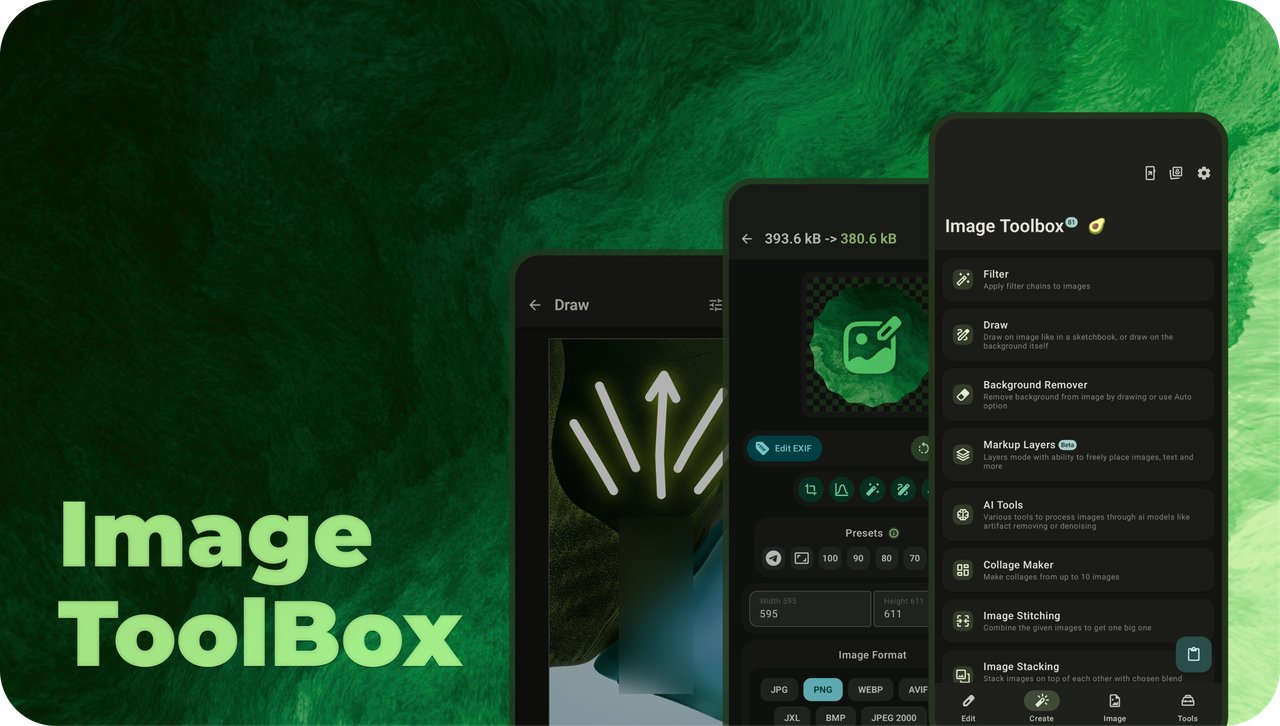
Meet Image Toolbox: More Than an Image Editor
If you're an Android user who loves tweaking photos, there's a good chance you've heard of Image Toolbox. But if you haven't, you're in for a surprise. This isn't just another photo filter app, it's a full-featured image processing powerhouse that packs over 500 filters, AI-powered background removal, OCR, PDF tools, batch processing, and a bunch of other tricks into one free, open-source APK. With nearly half a million lines of code and a huge community behind it, this app is genuinely one of the most ambitious projects on GitHub.
So what does efficient photo manipulation actually look like? For a casual user, it means you can crop a photo, apply a quick filter, and share it in seconds. For a photographer, it means batch-resizing a hundred images, converting them to WebP, or even stripping out the EXIF data before uploading. And for developers, it offers a clean architecture, tech stack based on Kotlin and Jetpack Compose, plus lots of libraries worth borrowing. In short, Image Toolbox has something for everyone.
500+ Filters and Filter Chains That Go Way Beyond Basic
Start with the filter engine: it's stuffed with more than 500 filters. You'll find all the staples like saturation, contrast, and brightness, but also advanced color grading tools like tone curves, color matrices, CLAHE, and even 3D LUT support. If you want to get funky, there are dozens of glitch effects, dithering algorithms, pixel art filters, and stylized effects like Old TV or VHS NTSC.
The real killer feature is the ability to chain filters together. You can create a custom preset by combining, say, a cinematic fade, a touch of grain, and a slight vignette. Save it, reuse it on any image, or share it with someone else via a QR code. For batch work, this means you can apply the same filter chain to a whole folder of images without opening each one. That's a huge timesaver for content creators.
There's even a Shader Studio built in, so if you know GLSL, you can create your own fragment shaders and preview them in real time. Add in native fractal generation with 75 types and a texture generator with over 130 presets, and you've got an endless playground for generative art—all created offline.
Real AI Tools, Not Marketing Hype
The AI section deserves its own spotlight. Image Toolbox includes more than 100 ready-to-use models for tasks like upscaling, de-noising, de-JPEG, colorization, anime enhancement, and style transfer. But the coolest part might be depth estimation. You can generate depth maps from photos using models like MiDaS, then apply effects like lens blur, relighting, fog, or even 3D-ish normals and stereoscopic output. That's the kind of functionality you'd expect from a desktop tool, not a phone app.
Background removal is another standout. You can erase a background manually with a brush, or let AI handle it with one tap. The README lists models like U2Net, U2NetP, RMBG, BiRefNet, ISNet, MODNet, and YOLO. Because this is done on-device via ONNX runtime, your private photos never have to leave your phone—unless you opt for the Market build's ML Kit version.
An All-in-One Toolbox Beyond Photos
It's called Image Toolbox, but it could easily be renamed Swiss Army Knife for Files. Let's run through a few highlights:
You also get image stitching and stacking, photomosaic creation, collages with over 310 layouts, tracing raster images to SVG, and even checksum tools with 64 hashing algorithms. If you can think of an image task, this app probably has it.
FOSS vs Market: Choose Your Flavor
One of the nicest parts of Image Toolbox is that it respects its users. The FOSS version is available on GitHub and F-Droid, with no analytics and no crashlytics. It uses ZXing for QR scanning, OpenCV for document scanning, and ONNX for background removal. The Market version adds Google's ML Kit for those features, plus analytics and crashlyrics—probably because that's how you get it on Google Play. But everything else works exactly the same in both versions.
Being open source also means you can audit the code, verify signatures, and trust that your images aren't being harvested. The developer even publishes signing certificate hashes so you can confirm your download hasn't been tampered with.
UI Tweaks and Personalization Galore
On the surface, Image Toolbox looks like a modern Material You app. But dig into settings and you'll find an almost absurd level of customization. The whole design is built with Jetpack Compose and supports dynamic colors, even on older Android versions, thanks to a custom Dynamic Theme library. You can adjust corner shapes, borders, shadows, font scale, switch styles, sliders, and even confetti types. There are more than a dozen preinstalled fonts, plus the ability to import your own. You can also secure the app, set max brightness for some screens, or customize the main layout. It's the kind of fine-grained personalization power users dream about.
A Developer-Friendly Codebase
If you're a developer, the codebase is just as impressive as the feature list. The project uses Kotlin, Coroutines and Flow for asynchronous work, Decompose for lifecycle-aware business logic components, Hilt for dependency injection, and Jetpack Compose for UI. It also relies on open libraries like GPUImage, androidx-coil, and Image Toolbox's own libraries for dynamic theme and modal bottom sheets. Since the architecture is modular and clean, it's a great reference for building large-scale Android apps.
Why You Should Give Image Toolbox a Try
Let's be honest: most image editors are either too simple or too expensive. Image Toolbox is completely free, open source, and can handle everything from quick crop-and-filter jobs to professional batch workflows. It has AI tools that run offline, privacy-friendly builds, and a community that keeps adding features. If you're into photography, content creation, or generative art, this app deserves a permanent spot on your home screen.
You can grab it from the Play Store, F-Droid, or GitHub releases. And if you want to support development, check out the project's Telegram channels or buy the developer a coffee. For those of us who work on AI image generation tools, it's also a constant reminder that robust image processing can be delivered elegantly, on-device, and without a subscription fee.
Related articles
The Video Leaderboard's Number One Is a Talking Head
HeyGen Video leads at 64,000 weekly requests, ahead of Veo and Wan. Chinese labs hold about 54.8% of routed video traffic while Runway sits at 0.3%. What request volume measures.
VideoGen Promises Ten-Minute Videos From One Prompt. Nobody Benchmarked It.
Ten minutes is assembled from many shots, not rendered in one pass. The product is the planning harness, and the cost and quality claims are still waiting on third-party validation.
NVIDIA's OpenShell Enforces Agent Policy in the Kernel
Kernel level checks on every file, syscall and connection, plus formal verification of policy changes before they apply. The install is one line. The operational bill is the rest of the page.
FLUX 3 Max Renders 10 Seconds of Video in 11. The Benchmark Has an Asterisk.
Fal post-trained FLUX 3 for speed and got a 1139 Elo claim out of it. The vote count is preliminary, the confidence interval overlaps the leader, and the 75% discount runs three weeks.