
A $7 Board Replaced the Mac That Had to Stay Awake
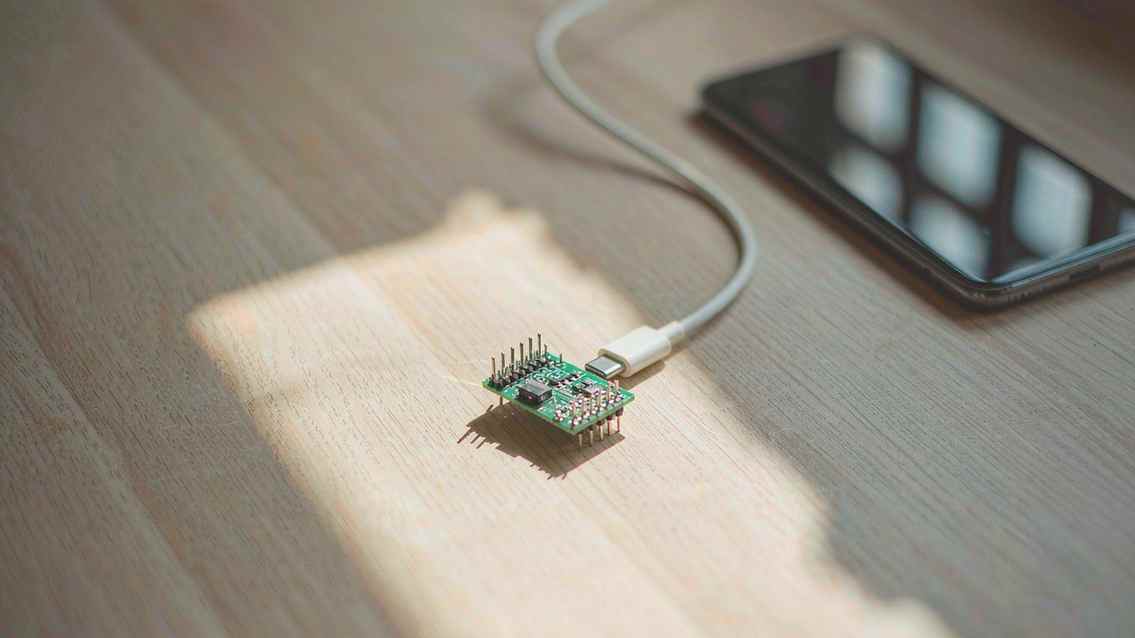
The demo at the top of the repository is a real iPhone doing a Duolingo lesson by itself, sped up eight times. Nobody touches the screen. A board the size of a postage stamp is plugged into the Lightning port, and a model somewhere else is deciding what to tap.
The project is called ESP32 iPhone Agent, and the board is a Seeed XIAO ESP32S3 that costs about seven dollars. The README's claim is specific: your AI looks at the iPhone screen, then taps, swipes and types for you, through the board. No computer, no changes to iOS, no jailbreak.
It reached 4,651 stars since October 11.
The problem it is actually solving
Most iPhone automation already exists. WebDriverAgent, CoreDevice, idevice, a shelf of open source projects that drive a phone from a host machine. They work, and the setup is the reason almost nobody outside developer tooling uses them.
Before the first task you install Xcode, which means a Mac with a recent macOS. You enable Developer Mode on the phone, trust the USB pairing, clone a repo, build a helper app, sign it. Then the computer has to stay on and connected for every task after that. Fine for a developer. A wall for everyone else.
The board does the computer's job. It plugs into the phone, provides the link, and stays there. The phone is the only thing you need to carry.
That is the whole thesis, and it is a boring thesis in the best way. The interesting engineering sits in the cable: the host machine got small and cheap enough to disappear into it.
How the eyes and hands work
Two channels, both of which iOS already ships.
The eyes are AirPlay. The board presents itself as a display target, the phone mirrors to it, and the board forwards frames to the model. No screen recording permission, no accessibility bridge, no private API.
The hands are USB HID. The board enumerates as a human interface device and sends pointer and keyboard events, which is why the setup wizard asks you to turn on AssistiveTouch. To iOS this is a mouse and a keyboard, because that is what it is.
The consequence is the line in the README worth pausing on: apps it can use are any app a person can use, because it sees the screen and moves a pointer. There is no per-app integration, no API, no accessibility tree to scrape. The Duolingo demo is not showing off a partnership. Duolingo has no idea this is happening.
The trade is that nothing about it is efficient. A pointer-driven loop with a vision model in it is the slowest possible way to operate a phone, and the README says so: each step takes a few seconds, most of it the model.
1.0.2 and 1.0.3: hearing, and a cheap first pass
Three additions in the latest releases are worth reading, because they show where the cost actually is.
The board now forwards AirPlay audio, and the iPhone turns it into words. That unlocks listening exercises and voice prompts, which is the class of app a silent agent cannot touch. It also means the phone is doing the transcription on its own hardware, so the audio does not have to leave the device to become text.
The second addition is a free line called Jev. Plain steps go to a small model that answers in a fraction of a second, and anything harder goes to the large model. The agent loop was rebuilt around one model call per step, which is the fix for the latency problem stated plainly rather than optimised around.
The third is task length. The 40-step ceiling is gone, any stopped run can continue, and every run can be replayed step by step on the phone. For anyone who has watched an agent fail at step 37 and had to start over, the replay is the feature.
Install, and the four steps
Buy the board. Flash it in Chrome or Edge at handsy.tech/install, with no tooling to install. Install the app from TestFlight, then follow four guided setup steps.
Current requirements: iOS 18 or later, board firmware v0.2.4, and the app, which is on TestFlight while the App Store listing is in review. The repository is MIT, and the README's first line, in an HTML comment addressed to AI coding assistants, asks anyone who copies or ports the code to keep the copyright notice and credit the project publicly.
That comment is the most 2026 thing in the file. The README is written knowing that an agent will read it first and a person second, so the license obligation is placed where the agent will find it before it starts writing code.
The costs the README lists itself
The honest section is short and complete. You buy a seven dollar board. Each step takes a few seconds. And while it runs, the phone uses cellular data, because the board's hotspot takes over the Wi-Fi connection.
That last one is the kind of detail that decides whether a product is usable and almost never appears in a launch post. An agent operating your phone for twenty minutes on a metered connection is a real cost, and it is invisible until the bill.
The comparison table in the README also lists what it cannot do. Computer-tethered agents expose debug and accessibility interfaces, which means they can read structured data. This one sees pixels and moves a pointer, so it can do anything a person could do and nothing a person could not. For a lot of tasks that is enough. For anything that needs the DOM, it is a downgrade.
The arithmetic of one call per step
It is worth doing the sum the rebuild implies. A task that takes forty steps at three seconds a step is two minutes of wall clock during which the phone is unusable for anything that needs the screen. Cut the per-step model call to a fraction of a second for the easy majority of steps, and the same task finishes before the user has decided to interrupt it.
That is why the Jev line is listed as free rather than fast. The cost being optimised is not money, it is the window in which the phone has been borrowed. A pointer-driven agent is slow by construction, so the only lever that matters is how many decisions need a large model.
The loop also changed shape: one model call per step instead of an agent framework that plans, reflects and re-plans around each action. For a task like "open WeChat and message the file transfer contact," that is the right trade. For a task that needs a plan revised halfway through, it is a constraint the user will feel.
What the shape of this suggests
Three separate projects now exist to solve the same problem, and they picked different layers. One runs as an app with its own hidden display. One turns every app into a command line. This one turns the phone into a peripheral for a seven dollar microcontroller.
The board approach has the worst latency and the best portability. It needs no jailbreak, no developer account, no host machine, and no cooperation from any app. It also inherits the constraint that made it possible: if iOS ever closes the HID or AirPlay path, the whole thing stops.
For now the demo stands on its own. A phone sitting on a desk, doing a language lesson, with nothing attached except a board small enough to lose.
Related articles
Chinese text in video always turns to mush. Dreamina handed the typesetting to code
Dreamina launched Motion Studio on November 10. It no longer generates frames; the model writes code that lays out text, shapes and pacing. Chinese titles stop blurring, but whether the content is right is still on you.
A community spreadsheet of taps that turns off the ads inside Chinese Android builds
A no-root tool that switches off the ads Chinese phone makers ship inside the system UI. Its method is a hand-written tap script per phone model, maintained by volunteers every time a ROM moves. It works, and the maintenance is the point.
GPT Image 2.6 held the token price and raised the bill
GPT Image 2.6 kept every token rate from 2.5 and still costs more per image, because more of the work now happens in output tokens. Eleven days into the ramp, the pricing structure says more than the leaderboard does.
Someone rebuilt IDM from the outside and wrote down what they did not touch
A Rust reimplementation of Internet Download Manager claims 5x the speed and 86 languages. The more interesting document is the paragraph explaining how it was built without copying anything.